Setting Up Your Reelow Account
Getting Started · Last updated August 16, 2026
Create your company account, choose a plan, add a payment method, and sign in — step by step.
Creating a Reelow account takes about five minutes and starts a 30-day free trial. You will create the company account, choose a plan, add a payment method (no charge today), and sign in. Signup happens at reelowcrm.com/company-signup.
Before you begin
- Have your company name and a work email address ready — the email becomes your owner login.
- Have a credit or debit card available. It is saved for after the trial but not charged today.
- If you work with Elevate Moving Sales, say so during plan selection — Elevate partners get the full Professional feature set at the partner price.
Step 1 — Create your company account
- Go to the signup page at /company-signup.
- Fill in Company Name, First Name, Last Name, and Email.
- Choose a Password (at least 8 characters). Use the eye icon to show or hide it.
- If you have a Discount Code, enter it in the optional field.
- Click Continue. By continuing you agree to the Terms of Service and Privacy Policy, linked below the button.
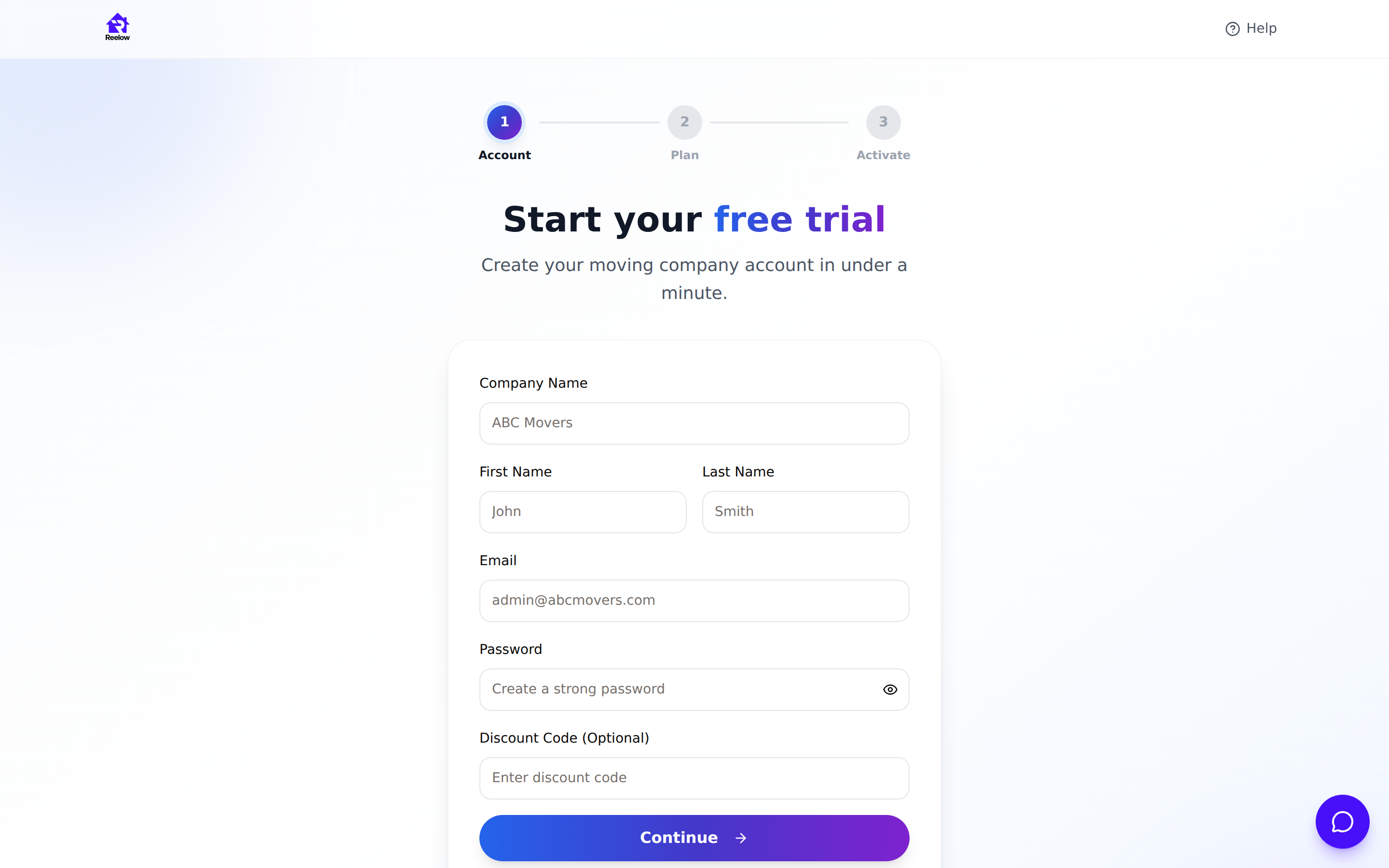
You will see a "Welcome to Reelow CRM!" confirmation, and after a moment you are taken to plan selection.
Step 2 — Choose your plan
- Answer "Are you working with Elevate Moving Sales?" with Yes or No. This question must be answered before you can continue. Answering Yes shows the Elevate Partner Plan — the full Professional feature set at $79.99/month instead of the regular $199.99.
- If you answered No, pick Starter Plan ($79.99/month) or Professional Plan ($199.99/month). Starter does not include SMS texting, automation workflows, or advanced analytics. Professional (marked "Most Popular") includes everything.
- Click Continue with [your plan].
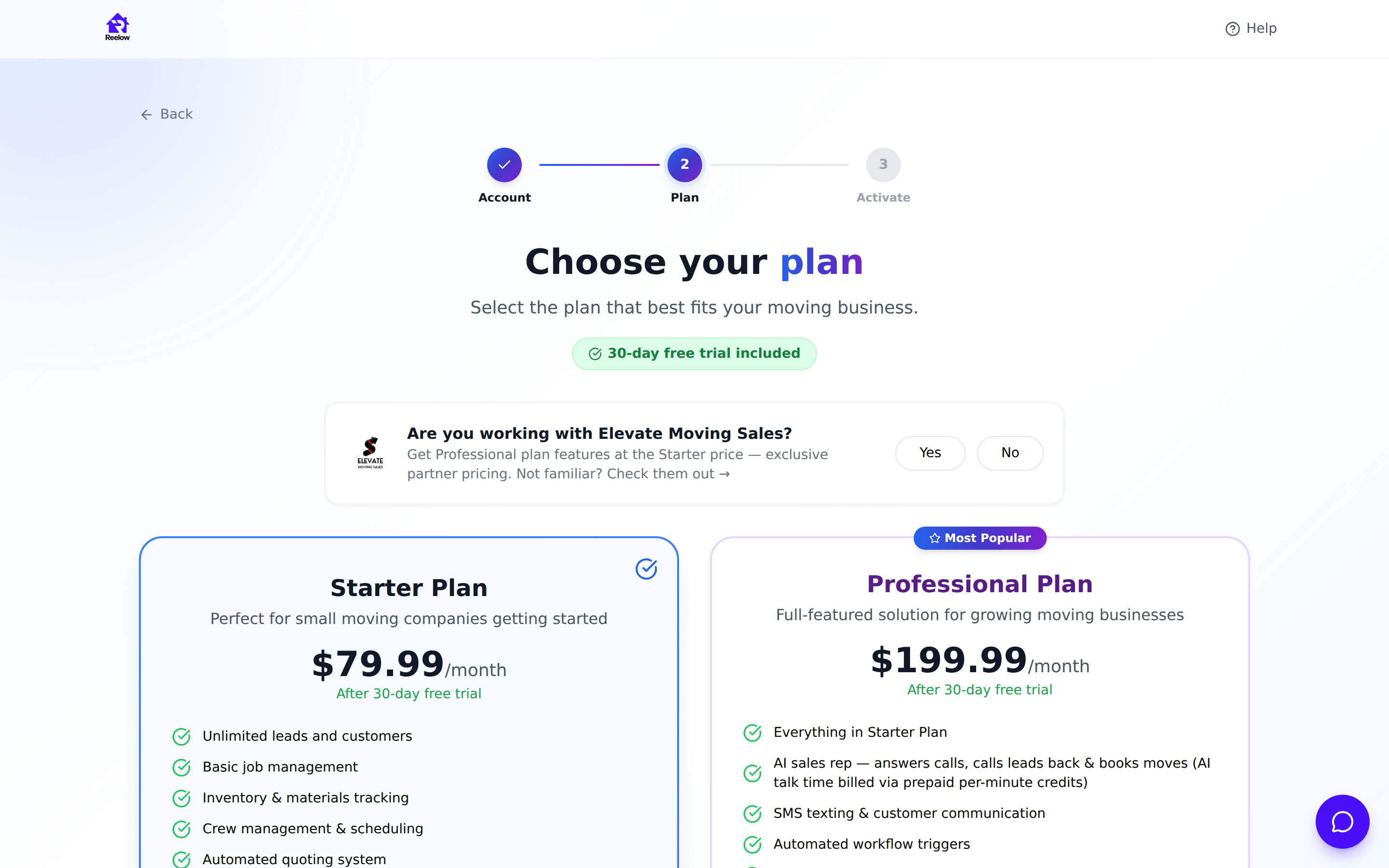
Note: You can change plans later — contact the Reelow team from the help contact page to switch.
Step 3 — Add your payment method
- On the Complete your setup page, enter your card in the Payment Information section. Payments are processed by Stripe; Reelow never stores your raw card number.
- Check the three required boxes under Legal Agreements Required: the Terms of Service, the Privacy Policy, and the Subscription Agreement.
- Click Start Free Trial – No Charge Today.
A confirmation screen shows Your 30-Day Free Trial and Payment Method Confirmed. Your card is only charged when the trial ends.
Step 4 — Sign in
- Click Continue to Sign In on the confirmation screen (or go to the login page any time).
- Enter your Email Address and Password and click Sign In.
- You land on your dashboard. Owners and office staff land on the Dashboard; movers are taken to My Schedule instead.
What happens next
Your company workspace is live. Head to Settings to complete your company profile and set your pricing, then take a tour of the dashboard.
Troubleshooting
- "Password too short" — passwords must be at least 8 characters.
- Card declined at billing setup — try another card, or contact your bank; the trial cannot start without a valid payment method on file.
- Started signup but didn't finish? Use Start Over on the billing page to return to signup, or simply sign up again with the same email if the account was never completed.
- Forgot your password — use the Forgot password? link on the sign-in page.
Was this article helpful? Let us know from this page in the app, or contact support if you're stuck.
Frequently asked questions
Will I be charged when I sign up?
No. Signup starts a 30-day free trial. Your card is saved securely with Stripe but is not charged until the trial ends, and you can cancel before then.
What's the difference between Starter and Professional?
Starter ($79.99/month) covers the core CRM. Professional ($199.99/month) adds SMS texting, automation workflows, and advanced analytics. Elevate Moving Sales partners get the Professional feature set at the partner price.
Can I add my team during signup?
Signup creates the owner account only. After you sign in, add salespeople, dispatchers, and movers under Settings → Staff.
Is my payment information safe?
Yes. Card details are entered into and stored by Stripe, a PCI-compliant payment processor. Reelow never sees or stores your full card number.
Related articles
Previous: Getting Started With Reelow · Next: Navigating the Reelow Dashboard
Still need help?
Contact the Reelow team, or call our 24/7 AI assistant at (737) 218-1003.